How to Install IPTV Smarters Pro on Windows
Follow these simple steps to install IPTV Smarters Pro on your Windows PC and start enjoying your favorite content.
1. Go to the search engine and type in "IPTV Smarters Pro".
2. Then open the website https://www.iptvsmarters.com
3. Select Downloads in the Menu
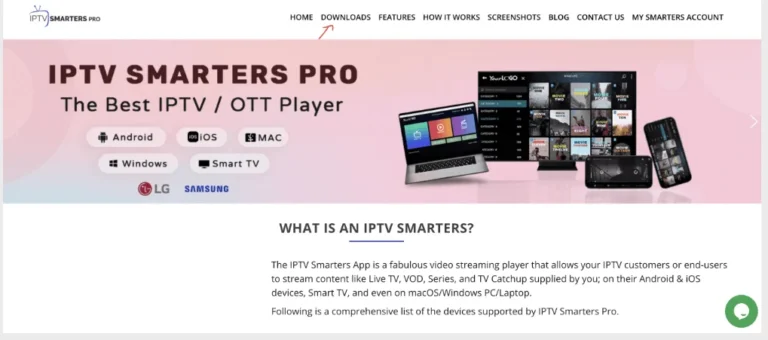
4. Download the new version of IPTV Smarters Pro.
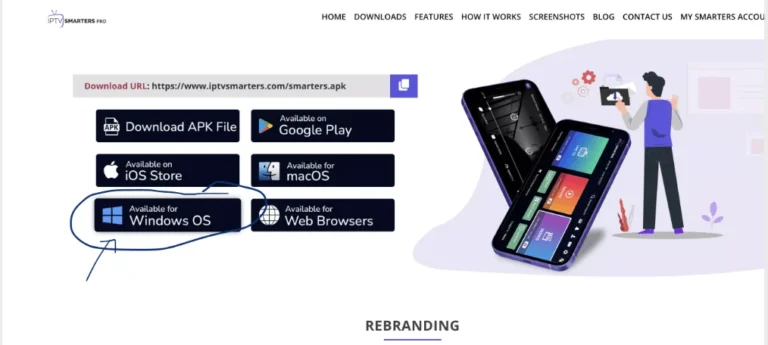
5. After the file download is complete, click on the executable file
6. Windows will ask you for permission to open this file. Select "Yes"
7. The file will now begin the installation process. This should take between 1 and two minutes
8. Once the installation is complete, start the IPTV Smarters program. Click Add New User and select Login with Xtream Codes API, Add your login data (username, password and Portal URL) for your IPTV service.
9. You are now ready to start watching content on IPTV Smarters Pro!
Note: If you still have issues, please take a photo of your Mac address and device key with your phone and send it to our team via EMAIL: contact@8k-iptv.com or contact us via WhatsApp.
How to Install IBO Pro App on Windows
IBO Pro is another excellent option for Windows users. Follow these steps to get started.
1. Go to the search engine and type in "IPTV IBO Pro".
2. Then open the website https://iboplayer.pro/
3. Select the URL for Download.exe file
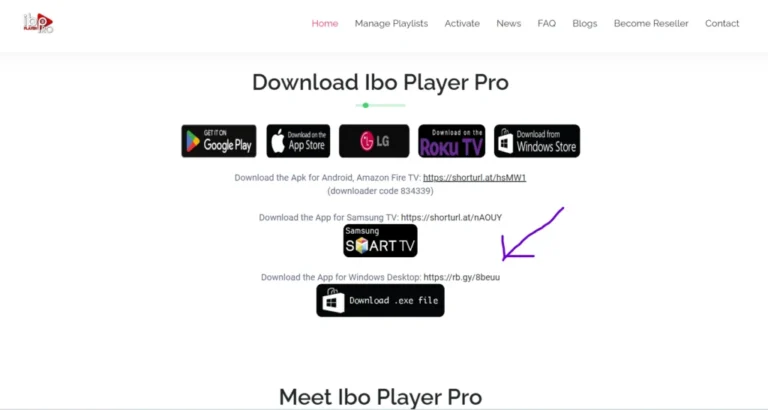
4. Download the new version of IPTV IBO Pro.
5. After the file download is complete, click on the executable file
6. Windows will ask you for permission to open this file. Select "Yes"
7. The file will now begin the installation process. This should take between 1 and two minutes
8. Once the installation is complete, start the IBO Pro program. Click Add Playlist and select Login with Xtream Codes API, Add your login data (username, password and Portal URL) for your IPTV service. Or With M3u Url.
9. You are now ready to start watching content on IPTV IBO Pro!
Enjoy your Subscription!
Price: The app gives you a 7 days free trial after that it will show you instructions on how to pay 8€ / Lifetime (we don't own the app)
Note: If you still have issues, please take a photo of your Mac address and device key with your phone and send it to our team via EMAIL: contact@8k-iptv.com or contact us via WhatsApp.